AI Rehearsal Coach for Mac: Practice Before the Real Call
Most presenters only discover delivery problems during the real meeting: rushing, weak pauses, poor framing, or posture that looks less confident on camera. CueNotch AI Rehearsal Coach gives you a private practice space before that happens.
Short Answer
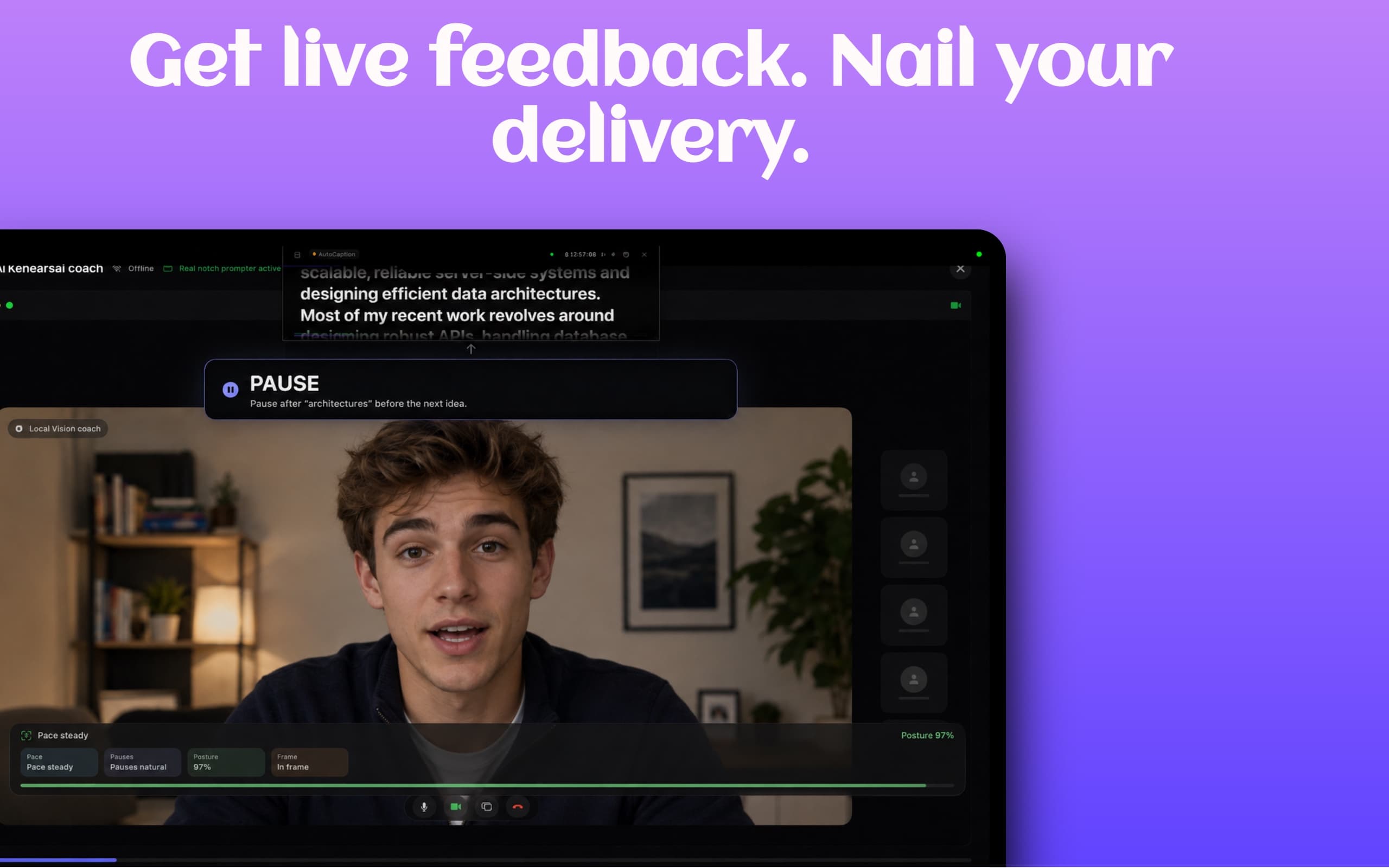
CueNotch AI Rehearsal Coach is a Mac presentation practice tool built into a notch teleprompter. It helps you rehearse scripts with feedback on pace, pauses, posture, and framing, then move directly into live delivery with voice-synced scrolling and Ghost Mode.
What Rehearsal Coach Solves
A normal teleprompter helps you read. A rehearsal coach helps you perform. CueNotch surfaces simple feedback before the audience joins, so you can tighten delivery without needing a producer, coach, or repeated video review.
Best Use Cases
- Zoom interviews where you need structured answers without sounding rehearsed.
- Sales calls where pacing and confidence decide whether prospects stay engaged.
- Investor updates, product demos, lectures, and internal presentations.
- YouTube scripts and Loom recordings where every retake costs time.
- Students practicing class presentations or oral exams from a MacBook.
Step-by-Step Workflow
- Write or paste your script into the CueNotch script editor.
- Use Magic Polish if the draft sounds too stiff or written.
- Open Rehearsal Coach and practice your delivery before the meeting.
- Review feedback on pace, pauses, posture, and framing.
- Make small edits, rehearse again, then start the notch teleprompter for the real call.
How It Compares to Generic Practice Tools
Screen recorders and camera apps can show you how a take looked, but they do not connect naturally to your script, teleprompter, or screen-share privacy workflow. CueNotch keeps practice, script polish, memorization, and live prompting in the same Mac-native app.
Compared with standalone notch teleprompters, CueNotch focuses on the full speaking loop: organize the script, improve the wording, rehearse the delivery, and present from the notch while staying hidden during screen sharing.
Related CueNotch Guides
- How to memorize scripts for presentations
- How to use a teleprompter for Zoom interviews
- Best voice-activated teleprompter for Mac
FAQ
What does CueNotch AI Rehearsal Coach check?
It helps you practice the practical parts of delivery: pace, pauses, posture, and camera framing. Those are the details that often make a scripted answer feel natural instead of read aloud.
Is it a replacement for the teleprompter?
No. Rehearsal Coach is for practice. The notch teleprompter is for live delivery, especially when you want eye contact and discreet notes during a call.
Can I use it before Zoom interviews or sales calls?
Yes. It is built for the same workflows where confidence matters: interviews, sales calls, presentations, demos, lessons, and recordings.
macOS 14+ · Free 3-day trial · $7.99/week or $29.99 lifetime access. Local App Store pricing may vary.
Frequently asked questions
- What does CueNotch AI Rehearsal Coach check?
- CueNotch AI Rehearsal Coach helps presenters practice pace, pauses, posture, and camera framing before meetings, interviews, presentations, and recordings.
- Is AI Rehearsal Coach a replacement for a teleprompter?
- No. Rehearsal Coach is the practice layer. The CueNotch notch teleprompter is the delivery layer, with voice-synced scrolling and Ghost Mode for screen sharing.
- Can I use it before Zoom interviews or sales calls?
- Yes. It is designed for on-camera workflows such as Zoom interviews, sales calls, product demos, classes, and executive presentations.