What Is a Voice-Activated Teleprompter?
A voice-activated teleprompter uses real-time speech recognition to track what you're saying and advance the script accordingly. When you speak, the text scrolls. When you pause, to answer a question, take a breath, or think, the text stops. When you resume, it picks back up exactly where you left off.
This is fundamentally different from fixed-speed scrolling, which forces you to match the teleprompter's pace instead of the other way around. With voice-synced scrolling, the teleprompter matches you.
Why Voice Scrolling Beats Fixed Speed
Fixed-speed teleprompters have been the standard for decades in broadcast TV, but they come with a fundamental problem: humans don't speak at a constant rate. You speed up when you're excited, slow down for emphasis, and pause between thoughts. A fixed-speed scroller ignores all of this.
The result? You either rush through important points to keep up with the scroll, or the text gets ahead of you and you lose your place. Both outcomes make you sound less natural and more robotic: the exact opposite of what a teleprompter should do.
Voice-activated scrolling eliminates this entirely. The teleprompter becomes an extension of your natural speaking rhythm. You never have to think about pacing, scrolling, or keeping up. You just talk.
How CueNotch's Voice-Synced Scrolling Works
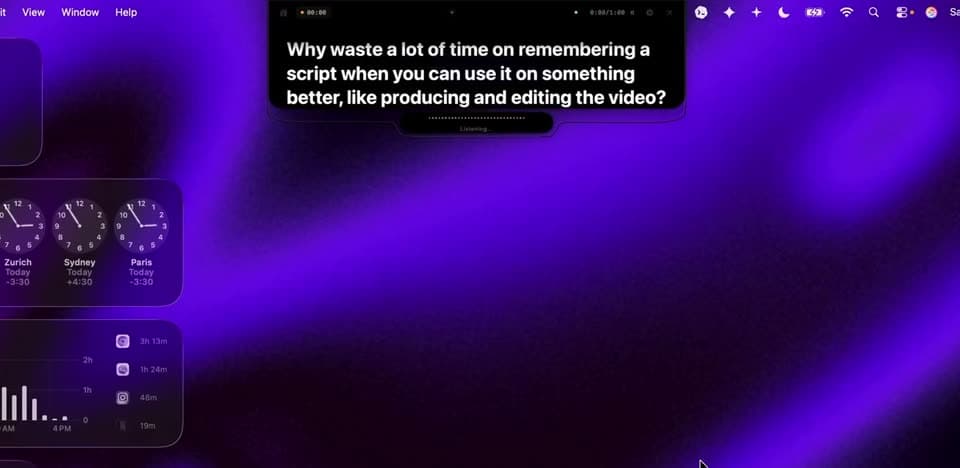
CueNotch uses Apple's on-device speech recognition framework to process your voice in real time. Here's what that means in practice:
- Real-time word matching. As you speak, CueNotch matches your spoken words to the text in your script and advances to the current position. It doesn't just scroll at your average speed. It tracks your actual words.
- Automatic pause detection. When you stop speaking, the script stops scrolling. Whether you're pausing for effect, answering an audience question, or just collecting your thoughts, the teleprompter waits.
- On-device processing. All speech recognition happens locally on your Mac. Your voice data never leaves your computer, no cloud APIs, no internet connection required during use.
- Works with your MacBook's built-in mic. No external microphone needed. CueNotch uses whatever audio input your Mac is using, including AirPods or external mics if you prefer.
No Foot Pedals, No Remotes, No Extra Hardware
Many teleprompter setups require a Bluetooth foot pedal or remote control to advance the script. These work, but they add complexity: you need to buy the hardware, pair it, keep it charged, and remember to bring it to every recording or call.
CueNotch's voice scrolling eliminates all of that. Your voice is the controller. This is especially valuable for video calls, where you need both hands free and can't be seen reaching for a remote. The teleprompter just follows along as you speak naturally.
The Notch Advantage: Voice Scrolling + Eye Contact
Voice-activated scrolling is useful on any teleprompter, but it matters more when combined with CueNotch's notch-based display. Because the script appears right next to your MacBook's camera, you get two benefits at once:
- Your script scrolls automatically with your voice, no manual control needed.
- Reading the script looks like direct eye contact to your audience, because the text is millimeters from the lens.
This combination is why CueNotch is particularly powerful for Zoom calls, sales calls, and YouTube recordings. You maintain natural eye contact while reading your script, and the script follows your pace without any manual intervention.
How Does CueNotch Compare to Other Voice Teleprompters?
Several Mac teleprompter apps offer voice-synced scrolling, but not all implementations are equal:
- CueNotch: Voice-synced scrolling with notch display, Ghost Mode for invisible screen sharing, and AI Magic Polish for script optimization. CueNotch Pro is $7.99/week or $29.99 lifetime access in the U.S. App Store. Local App Store pricing may vary.
- Moody: Voice scrolling with notch display, currently advertised at $39 one time. Its public page does not clearly describe trial availability. See our updated Moody review.
- PromptSmart: A traditional iPad/iPhone teleprompter with voice-synced scrolling. Not designed for Mac, doesn't integrate with the notch, and requires a separate device.
For Mac users who want voice-activated scrolling without extra hardware, CueNotch offers the most complete package. For a full comparison of all notch teleprompters, see our 2026 roundup.
Frequently asked questions
- What is a voice-activated teleprompter?
- A voice-activated teleprompter uses speech recognition to scroll your script automatically as you speak. Instead of manually scrolling or using a foot pedal, the teleprompter listens to your voice and advances the text in real time. CueNotch is a voice-activated teleprompter for Mac that displays your script in the MacBook notch area.
- Does CueNotch work without a foot pedal or remote?
- Yes. CueNotch uses your MacBook's built-in microphone for voice-synced scrolling. No foot pedals, Bluetooth remotes, or external hardware required. Just speak naturally and the script follows your pace.
- What happens if I pause while speaking?
- CueNotch pauses the script when you stop speaking and resumes when you start again. This makes it natural for conversations, Q&A sessions, and any situation where you need to pause and think.
Just talk. It keeps up.
Voice-synced scrolling is in the free tier: 3 activations a day, scripts up to 100 words.
Try CueNotch Free on Mac App Store- macOS 14+
- Voice scrolling included free
- $7.99/week or $29.99 lifetime access